What is the Get set up box?
Updated 8 Oct 2026
It is a short trial checklist on the left. It only shows while your trial is on.
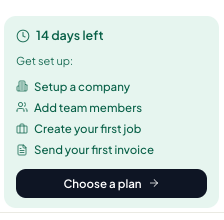
You will see N days left and these links:
- Setup a company → Settings, Account tab
- Add team members → Settings, Team tab
- Create your first job → Jobs
- Send your first invoice → Invoices
- Choose a plan → Settings, Billing tab
The box goes away after you pick a paid plan. Agents do not see it.