What is Income split?
Updated 8 Oct 2026
Income split is for contractor crews. Each person keeps a percent of the job money. The company keeps the rest.
Use it when the people in the field are independent contractors and their invoices go out in their own name. Employees on one company payroll stay on Traditional. The company sends every invoice, and agents do not see a share.
Income split is on the Business plan. The 14-day trial includes it. Starter and Pro stay on Traditional.
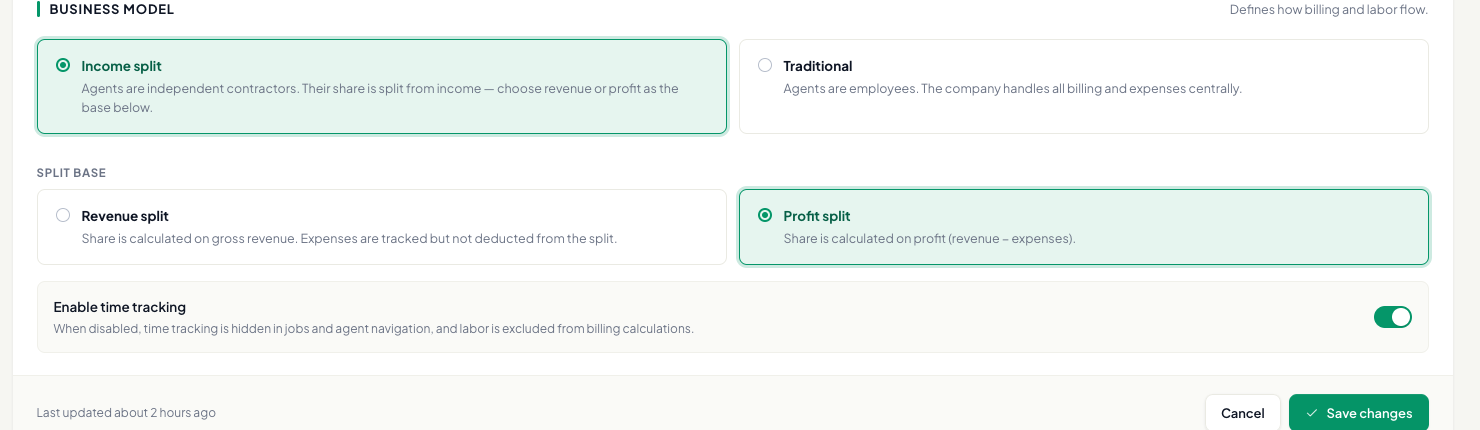
Settings → Account → Business model shows the two choices:
- Traditional — Agents are employees. The company handles all billing and expenses centrally.
- Income split — Agents are independent contractors. Their share is split from income — choose revenue or profit as the base below.
Under Split base, pick one:
- Revenue split — Share is calculated on gross revenue. Expenses are tracked but not deducted from the split. The percent is of the job total. Expenses are logged, and they are not taken out of the share.
- Profit split — Share is calculated on profit (revenue − expenses). Expenses come off first. The percent is of what is left.
Click Save changes. The confirm says Change business model? and No data will be deleted. Changes visibility and invoice issuer behavior.
Here is the same €100 job. The agent keeps 70%.
Revenue split. No expenses are taken out. The agent keeps €70. Company keeps 30% of revenue.
Profit split. A €20 expense comes off first, so €80 is left. The agent keeps €56. Company keeps 30% of profit.
The percent is Agent share of revenue or Agent share of profit on Settings → Team (see How do I set an agent's share and billing profile?). Fill Legal name and IBAN there so a quote or invoice can go out in that person’s name (see Who is the issuer on an invoice?).
The split uses money that was collected. When the week or month has ended, open Analytics, pick that person, and Settle (see How do I settle an agent's earnings?). They see the row under History on My Performance (see Where does an agent see payouts?).
If the company sends the invoice, or a manager does the job, that money is not split with a contractor. Analytics says No contractor share.
Gatavo records the split and the PDF. It does not pay the contractor’s bank for you.
A VAT-registered company can also see VAT on company fee on the settlement. See How do I settle an agent's earnings?.